Summary
Details
Updated August 26, 2026: We have updated the timeline. Thank you for your patience.
[What and Why]
We are introducing a new Microsoft Teams Facilitator capability that proactively detects and resolves knowledge gaps during meetings. Facilitator can identify when participants ask questions or express uncertainty and retrieve and share relevant answers using web search in the meeting chat. This enhancement helps improve meeting productivity by reducing interruptions and enabling teams to stay focused on goals while accessing needed information. If a participant asks a factual question and no one responds, Facilitator can provide an answer directly in the meeting chat.
This message is associated with Microsoft 365 Roadmap ID 558341.
[Rollout Schedule]
- Targeted Release: Beginning early November 2026 (previously early September) and expected to complete mid-November 2026 (previously mid-September)
- General Availability (Worldwide): Beginning mid-November 2026 (previously late September) and expected to complete mid-December 2026 (previously mid-October)
[Impact on Your Organization]
Who is affected
- Users in Microsoft Teams meetings where Facilitator is enabled with Microsoft 365 Copilot (Premium)
Platforms/Services
- Microsoft Teams (meetings)
- Microsoft 365 Copilot
What will happen
- Facilitator will monitor meeting conversations in real time to detect implicit or explicit information needs.
- When a knowledge gap is identified, Facilitator performs a web search and posts a response in the meeting chat:
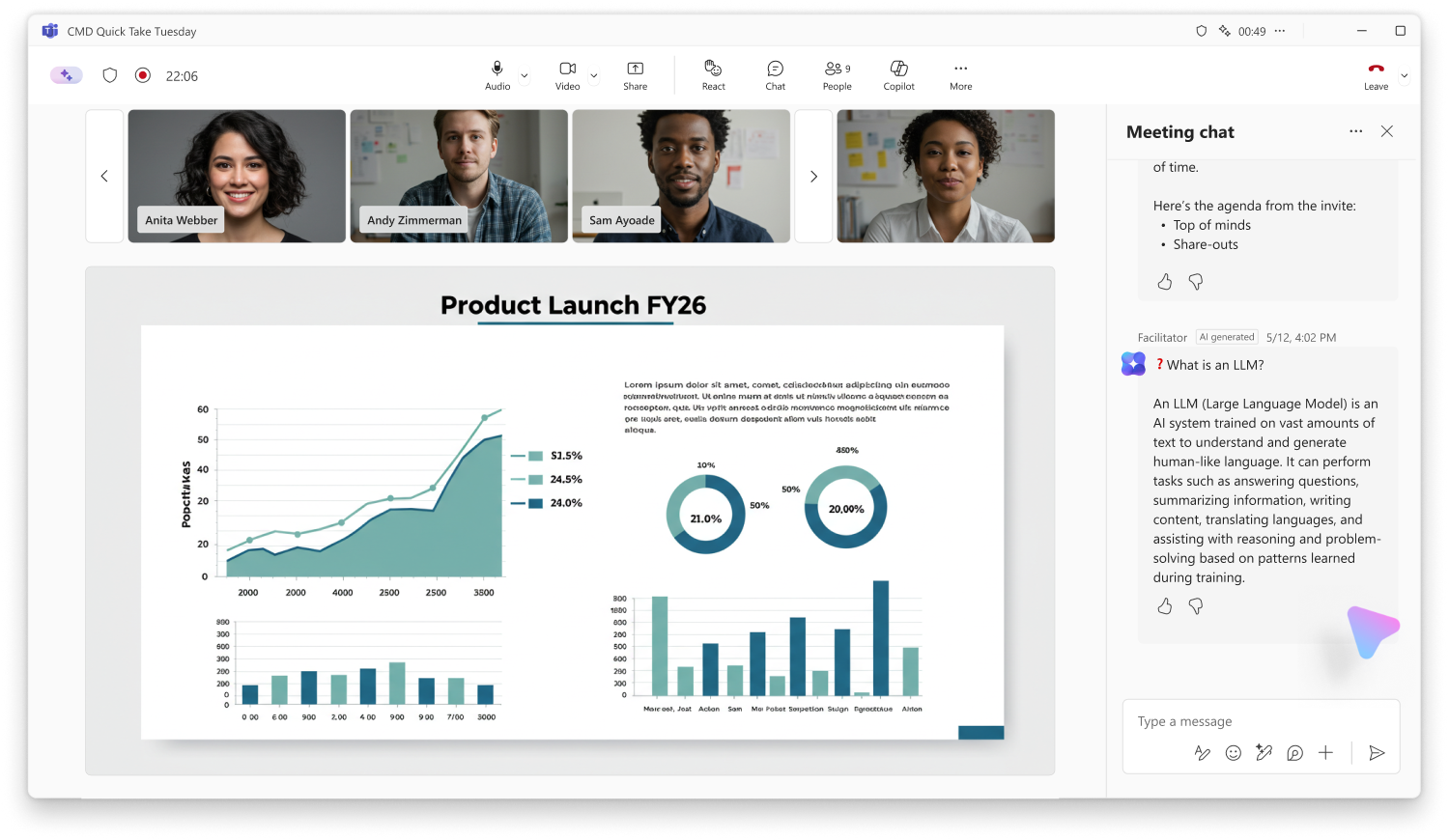
- Responses are infrequent in practice and typically occur less than once per meeting.
- Responses are limited to questions relevant to the meeting discussion based on agenda signals and conversational context.
- Facilitator must be manually added to the meeting and is not enabled by default.
- A user with a Microsoft 365 Copilot (Premium) license must enable Facilitator for the meeting. Other participants do not need to be licensed to receive responses.
- Admins can disable Facilitator at the tenant level. The feature depends on the Copilot web search setting. If web search is disabled, responses are not generated.
- Users can stop the behavior at any time by removing Facilitator from the meeting.
- The feature is supported in standard Teams meetings only and not supported in calls, webinars, or town halls.
- The experience is supported in meetings that include external or cross-tenant participants.
[Action Required/Recommendations]
No immediate action is required.
Recommended actions:
- Review your organization’s Copilot web search and Facilitator configuration settings to confirm alignment with your policies.
- Inform helpdesk and users about proactive Facilitator responses in meeting chats.
- Update internal documentation or training materials if you reference Teams meeting experiences.
[Compliance considerations]
| Question | Answer |
| Does the change alter how existing customer data is processed, stored, or accessed (for example, meeting conversations)? | Yes. The feature processes meeting conversations in real time to detect knowledge gaps and generate responses. |
| Does the change introduce or significantly modify AI or machine learning capabilities that interact with customer data? | Yes. Facilitator uses AI to interpret meeting content and generate contextual responses during meetings. |
| Does the change provide end users with a new way of interacting with generative AI? | Yes. Users receive proactive, AI-generated responses within the Teams meeting chat without needing to prompt the system. |
| Does the change include an admin control, and can it be controlled through configuration settings? | Yes. The feature depends on the Copilot web search setting, which admins can enable or disable to control functionality. |
| Does the change allow a user to enable or disable the feature themselves? | Yes. Users can stop the behavior by removing Facilitator from the meeting. |
Community Resources

Change History
Never Miss a Microsoft 365 Update
Join thousands of IT professionals who rely on DeltaPulse for real-time Microsoft 365 change intelligence, automated notifications, and community insights.