Summary
Details
Updated July 29, 2026: We have updated the timeline. Thank you for your patience.
[What and Why:]
Microsoft is introducing native access to brand assets (colors, logos, images, icons, and more) directly within PowerPoint through Microsoft 365 Copilot. This improves productivity by helping users quickly create presentations that stay on-brand while enabling admins to standardize branding through official brand kits.
This message is associated with Roadmap Id 566351.
[Rollout Schedule:]
- Targeted Release (Worldwide): Beginning in mid-July 2026 and expect to complete by late July 2026
- General Availability (Worldwide): Beginning in mid-July 2026 and expect to complete by late August 2026 (previously early August)
[Impact on Your Organization:]
Who is affected: All Microsoft 365 Copilot (Premium) licensed PowerPoint users and admins managing branding
Platforms/Services:
- PowerPoint (Windows, Mac, Web)
What will happen:
- Users can access brand assets (colors, logos, icons, images) directly within PowerPoint.
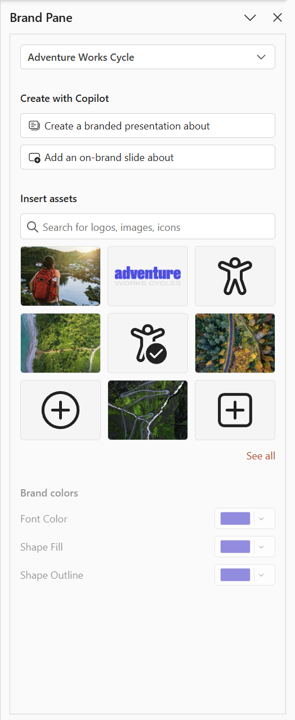
- Brand assets are surfaced through a dedicated brand pane to enable quick, on-brand edits.
- Official brand kits (if configured) will be available tenant-wide.
- Users without official kits can create personal brand kits.
- The feature is available to Copilot licensed users and does not require additional configuration for basic usage.
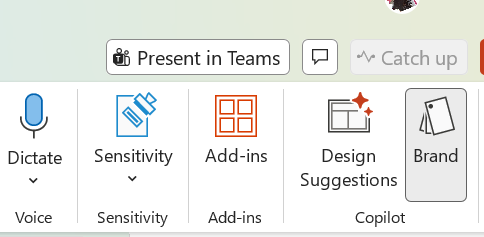
Screenshot 1: Locate the Brand option on the PowerPoint ribbon:
Screenshot 2: Brand pane in PowerPoint showing brand assets and colors:
[Action Required/Recommendations:]
No action is required to enable the default experience for licensed users.
For organizations that want centralized brand governance:
- Enable and assign Microsoft 365 Copilot licenses.
- Configure brand manager policy to designate brand managers.
- Create and publish official brand kits for tenant-wide use.
- Validate existing templates for optimal Copilot output.
- Communicate this feature to users and helpdesk teams.
Learn more:
- Enterprise brand manager policy setup | Microsoft Learn
- Create and manage official Brand kits in the Microsoft 365 Copilot app | Microsoft Support
- Keep your presentation on-brand with Copilot | Microsoft Support
[Compliance considerations:]
| Area | Explanation |
|---|---|
| Stores new customer data | Brand kits store organizational assets such as logos, templates, color palettes, and guidelines within Microsoft 365 Copilot. |
| Alters processing of existing customer data | Copilot uses existing templates and brand kit assets to generate presentations, influencing how organizational content is processed and applied. |
| Introduces AI/ML capabilities interacting with data | Copilot uses AI to analyze templates, brand kits, and prompts to generate on-brand presentations. |
| New generative AI interaction for users | Users can create presentations using Copilot prompts that automatically incorporate brand assets and styles. |
| Includes admin controls | Admins can configure brand manager policies and assign designated users to manage official brand kits. |
| User enable/disable capability | Users can create and manage personal brand kits when official kits are not centrally configured. |
Community Resources

Change History
Never Miss a Microsoft 365 Update
Join thousands of IT professionals who rely on DeltaPulse for real-time Microsoft 365 change intelligence, automated notifications, and community insights.