Summary
Details
Updated August 10, 2026: We have updated the timeline. Thank you for your patience.
[Introduction]
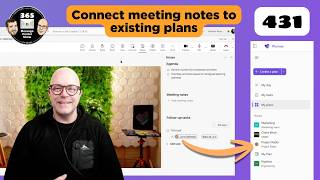
We are introducing a new capability that allows users to connect Microsoft Teams meetings to existing Microsoft Planner plans.
Currently, Teams meetings automatically create separate Planner plans for meeting-related tasks, which can result in tasks for the same initiative being spread across multiple plans. This update enables users to link meetings to an existing plan so tasks can be tracked in a single location, improving organization and continuity across ongoing work.
This message is associated with Roadmap ID 561490.
[When this will happen:]
- Targeted Release (Worldwide): We will begin rolling out in late September 2026 (previously late August) and expect to complete by end of September 2026 (previously mid-September).
- General Availability (Worldwide): We will begin rolling out early October 2026 (previously early September) and expect to complete by end of October 2026 (previously late September).
[How this affects your organization:]
Who is affected:
- Users who create or participate in Microsoft Teams meetings and use Microsoft Planner
- Organizations with Teams, Planner, and Loop enabled
What will happen:
- Users will be able to link a Teams meeting to an existing Planner plan.
- Tasks created during meetings can be added to the selected existing plan.
- If no plan is selected, meetings will continue to create a new Planner plan.
- This feature will be available by default.
- Facilitator (the meeting task automation capability) can create tasks in the selected plan.
- Users can manually create tasks if Facilitator is disabled.
- No changes to existing plans or previously created plans.
Learn more: Facilitator in Microsoft Teams meetings | Microsoft Support
[What you can do to prepare:]
- No action is required.
- You may want to:
- Ensure that Teams, Planner, and Loop are enabled in your tenant.
- Review whether Facilitator should be enabled for automated task creation scenarios.
- Update internal documentation or task management guidance if applicable.
- Inform helpdesk staff and users about this new option for organizing meeting tasks.
[Compliance considerations:]
| Question | Explanation |
| Does the change alter how existing customer data is processed, stored, or accessed (e.g. documents, emails, chats, etc.), if so how and to what extent? | Tasks created in Teams meetings can now be stored in an existing Planner plan instead of a new auto-generated plan, changing how task data is organized across plans. |
| Does the change introduce or significantly modify AI/ML or agent capabilities that interact with or provide access to customer data, if so summarize changes? | Facilitator can create and associate tasks with user selected Planner plans when enabled. |
| Does the change include an admin control and, can it be controlled through Entra ID group membership? | Availability depends on enabling Teams, Planner, Loop, and optionally Facilitator in the tenant. |
| Does the change allow a user to enable and disable the feature themselves? | Users can choose whether to link a meeting to an existing plan or continue using the default behavior. |
Community Resources
Change History
Never Miss a Microsoft 365 Update
Join thousands of IT professionals who rely on DeltaPulse for real-time Microsoft 365 change intelligence, automated notifications, and community insights.