Summary
Details
Updated June 29, 2026: We have updated the timeline. Thank you for your patience.
[Introduction]
A new Security Detection Report in the Teams admin center provides a unified view of messaging security detections across signals such as impersonation, malicious URLs, and weaponizable file types. This centralized reporting experience improves visibility into threats in Teams and helps admins investigate and respond to suspicious activity more efficiently.
This message is associated with Microsoft 365 Roadmap ID 560702.
[When this will happen:]
General Availability (Worldwide): Rollout will begin in late August 2026 (previously mid-July) and is expected to complete by early September 2026 (previously late July).
[How this affects your organization:]
Who is affected:
- Admins who manage Microsoft Teams environments and security operations
- Security and helpdesk teams responsible for investigating messaging threats
What will happen:
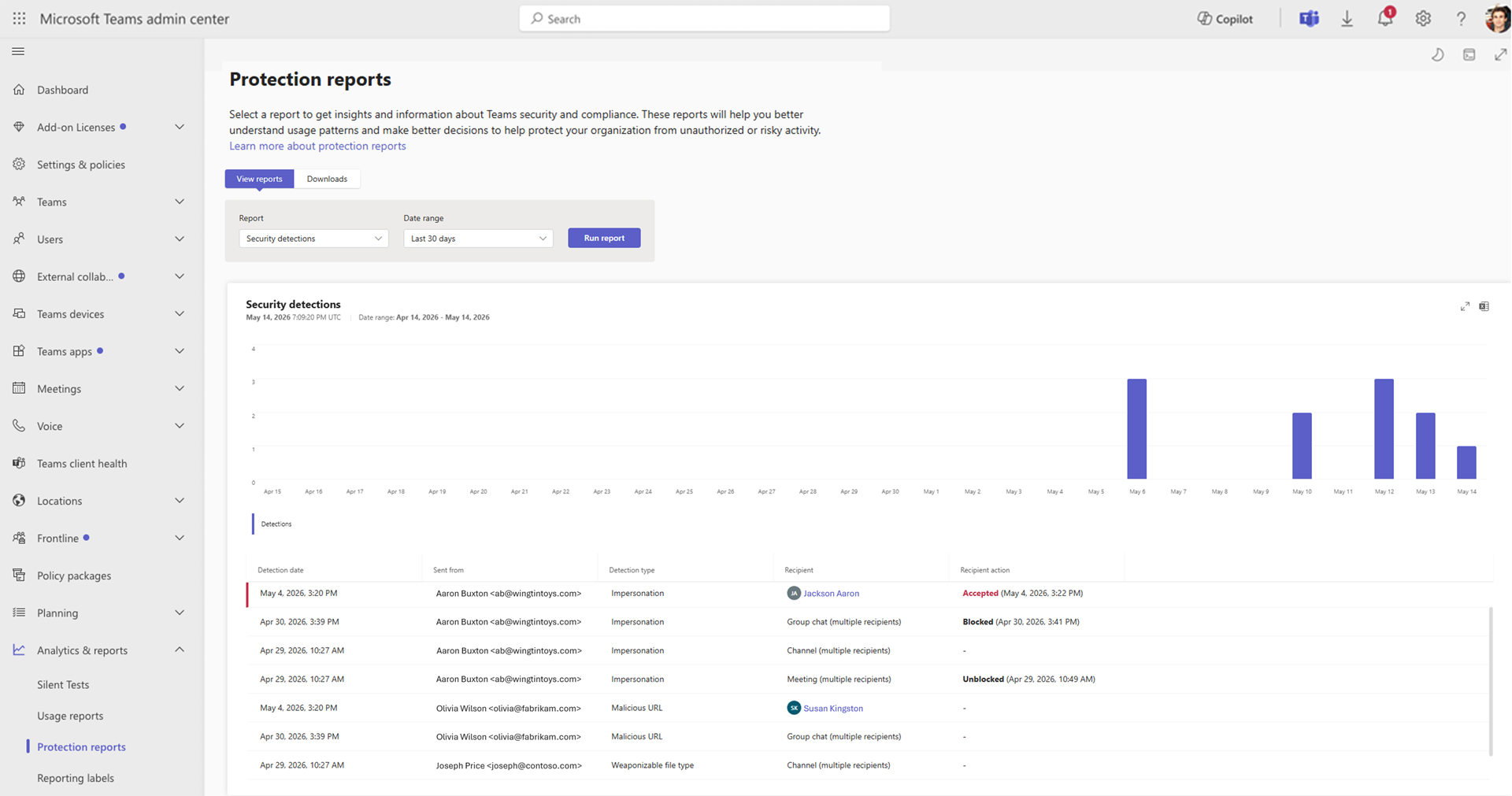
- A new Security Detection Report will be available in the Teams admin center under Analytics & reports > Protection reports > Security detections report.
- The report provides centralized visibility into messaging security detections across Teams, including impersonation attempts, malicious links, and unsafe file types.
- Admins can review detection details such as:
- Sender
- Recipient context
- Detection type
- Available user actions
- Admins can export report data for further investigation, including additional metadata such as sender identifier and thread ID.
- The following messaging security protections are enabled by default:
- Impersonation detection does not require configuration.
- Malicious link scanning can be managed through Messaging safety settings in the Teams admin center.
- Unsafe file type scanning can be managed through Messaging safety settings in the Teams admin center.
- Admins can block malicious external users identified in the report through External access settings to prevent further communication attempts.
Screenshot: Example of a Security Detection Report:
[What you can do to prepare:]
- Review current Messaging safety settings to confirm malicious link and file scanning configurations.
- Familiarize security and helpdesk teams with the new report and export capabilities.
- Update investigation and response workflows to incorporate Teams detection signals.
- Use Teams admin center navigation path to locate the report:
- Analytics & reports > Protection reports > Security detections report
- Update internal documentation or runbooks if you document security investigation processes.
Before rollout, we will update this post with new documentation.
[Compliance considerations:]
Introduces enhanced admin reporting for monitoring and investigating messaging security detections.
Change History
Never Miss a Microsoft 365 Update
Join thousands of IT professionals who rely on DeltaPulse for real-time Microsoft 365 change intelligence, automated notifications, and community insights.