Summary
Details
Updated August 5, 2026: We have updated the timeline. Thank you for your patience.
[Introduction]
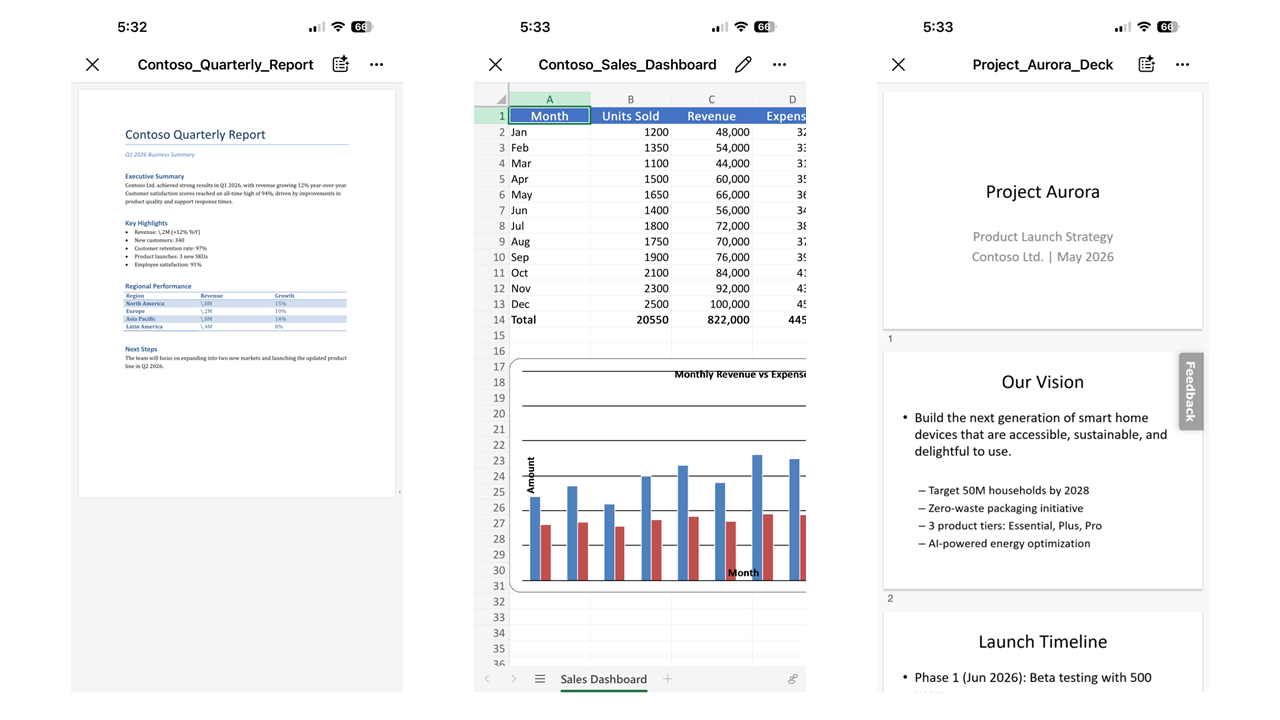
We’re introducing a standardized preview experience for Word, Excel, and PowerPoint files in Microsoft Teams across desktop and mobile platforms. This update improves performance, reliability, and consistency when previewing files, resulting in faster load times and fewer preview failures. Availability varies by platform; PowerPoint and Excel are supported on iOS and Android, while Word preview is currently available on iOS only.
This message is associated with Roadmap ID 558679.
[When this will happen:]
- General Availability (Worldwide): Rollout will be completed by end of August 2026 (previously late July).
[How this affects your organization:]
Who is affected:
- All Microsoft Teams users who preview Word, Excel, and PowerPoint files
- Mobile users on iOS and Android (platform-specific availability applies)
What will happen:
- Users will experience faster file preview load times in Teams.
- A standardized preview experience will be applied across Word, Excel, and PowerPoint files in Teams, with availability varying by platform:
- PowerPoint and Excel previewers available on iOS and Android
- Word previewer available on iOS only (Android support coming later)
- Users will be able to open protected files directly within Teams previews.
- Feature is enabled by default with no admin configuration required.
- This update does not change existing file storage, sharing permissions, or policies.
Screenshot: Standardized preview experience for Word, Excel, and PowerPoint:
 >
>
[What you can do to prepare:]
- No action is required from admins; the feature will be automatically enabled.
- Inform helpdesk and support staff of the updated preview experience.
- Update internal documentation referencing file previews in Teams.
- Communicate the improved experience to users if appropriate.
[Compliance considerations:]
No compliance considerations identified, review as appropriate for your organization.
Change History
Never Miss a Microsoft 365 Update
Join thousands of IT professionals who rely on DeltaPulse for real-time Microsoft 365 change intelligence, automated notifications, and community insights.