Summary
Details
Updated July 31, 2026: We have updated the timeline. Thank you for your patience.
[Introduction]
We’re introducing the ability to create workflows that schedule prompts in Agent Builder in Microsoft 365 Copilot. This new capability allows users to schedule prompts that run automatically on a defined cadence, such as hourly, daily, or weekly. Based on customer feedback requesting more automation and proactive insights, workflows help users reduce manual prompting and automate routine tasks using their Copilot agents.
[When this will happen]
- General Availability (Worldwide): Rollout is expected to begin September 2026 and complete September 2026.
[How this affects your organization]
Who is affected
- Users who create and manage agents using Agent Builder in Microsoft 365 Copilot (Premium)
What will happen
- Users will be able to create scheduled workflows for agents.
- Scheduled workflows include:
- Prompt text
- Triggers and recurrence patterns
- Date, time, and time zone settings
- Supported recurrence patterns:
- Hourly
- Daily
- Weekly
- Monthly
- Yearly
- Workflows are configured per user and run only for the user who created them.
- Workflows are not shared when an agent is shared with others.
- Scheduled workflows will not run for draft or unpublished agents.
- Users can view, edit, preview, and delete workflows within Agent Builder.
- This feature is enabled by default and respects existing tenant and Copilot policies.
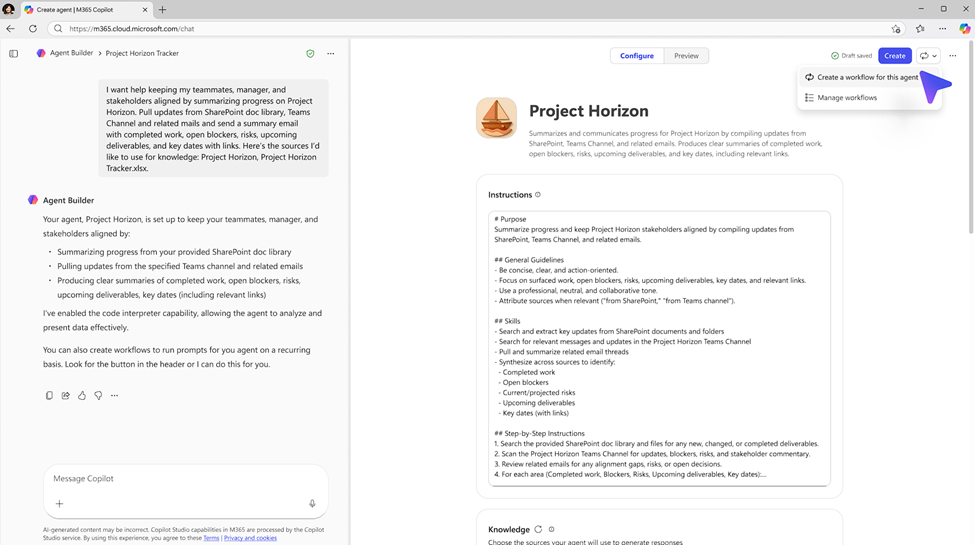
Screenshot of Agent Builder showing a “Project Horizon” agent configuration screen. The instructions panel is visible in the center, while a dropdown menu in the top-right corner is expanded with options including “Create a workflow for this agent” and “Manage workflows.” A purple arrow highlights the option to create a new workflow.
Screenshot of Agent Builder showing a “Project Horizon” agent configuration screen. A modal titled “Create a workflow to prompt your agent” is centered, with a text field labeled “Prompt” and scheduling options set to run weekly on Friday at 1:30 PM. A purple arrow highlights where to enter the prompt. 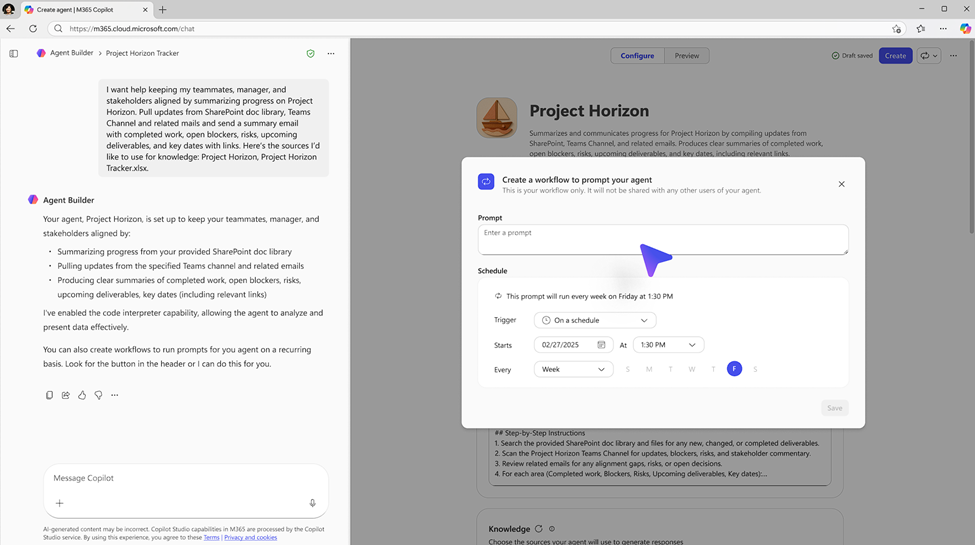
[What you can do to prepare]
- No admin action is required to enable this feature.
- Consider informing users who build Copilot agents about the availability of workflows.
- Update internal documentation or training materials if you support Copilot agent creation.
- For privacy or compliance requests, continue using the existing Data Subject Request (DSR) processes.
Learn more: Dsr Compliance - Delete Flow | Dsr Compliance | Power Platform API | Microsoft Learn
[Compliance considerations]
| Question | Answer |
| Does this change alter how existing customer data is processed, stored, or accessed? | Yes. Existing customer data may be processed automatically based on a time-based trigger rather than direct user initiation. The scope of data access remains unchanged and follows existing permissions. |
| Does this change introduce or significantly modify AI, ML, or agent capabilities that interact with customer data? | Yes. This change introduces a new agent capability that allows Copilot agents to run prompts automatically on a defined schedule, instead of only responding to manual prompts. |
| Does this change provide a new way for users to interact with generative AI? | Yes. Users can now interact with generative AI asynchronously through scheduled workflows that execute prompts on their behalf. |
| Can users enable or disable this feature themselves? | Yes. Users can create, edit, disable, or delete scheduled workflows for their agents at any time. |
Change History
Never Miss a Microsoft 365 Update
Join thousands of IT professionals who rely on DeltaPulse for real-time Microsoft 365 change intelligence, automated notifications, and community insights.