Summary
Details
Updated May 7, 2026: We have updated the timeline. Thank you for your patience.
[Introduction]
We are introducing a refreshed chat‑first design in the Microsoft 365 Copilot mobile app. This update modernizes the interface and streamlines navigation to make it faster and easier for users to start, continue, and manage chats. The improved experience is based on customer feedback and aligns the mobile app more closely with the broader Copilot visual design. The updated design will release first on iOS, followed shortly by Android.
[When this will happen]
- Public Preview: Rolling out in mid-May 2026 (previously late April) and expected to complete in late June 2026.
- General Availability (Worldwide, GCC, GCCH, and DoD): Rolling out in mid-May 2026 (previously late April) and expected to complete in late August 2026.
[How this affects your organization]
Who is affected
- All users of the Microsoft 365 Copilot mobile app on iOS and Android across Worldwide, GCC, GCC High, and DoD clouds
- This feature is available to both users with a Microsoft 365 Copilot license (Microsoft 365 Copilot users) and users without a Microsoft 365 Copilot license (Copilot Chat users), but the experience varies.
What will happen
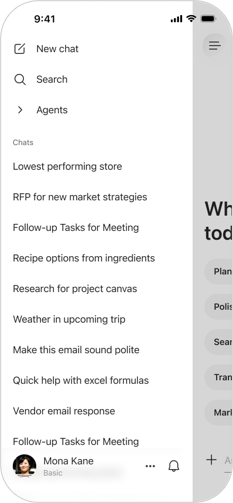
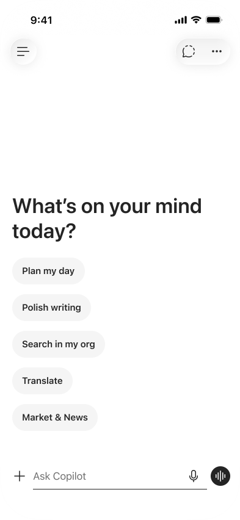
The Microsoft 365 Copilot mobile app will update automatically with a new chat‑first design. Key changes include:
- Updated, modern visual design language
- Simplified chat input that supports text formatting
- Updated chat response layout for easier viewing, copying, reopening, and accessing citations
- Refreshed visual experience for voice interactions
- Streamlined navigation, including:
- Unified profile and settings entry point
- Chat search moved into the navigation menu
- Create and Notebooks relocated to the overflow menu
- Chat settings consolidated into app settings
- The new UI will be on by default for all users.
- No existing workflows are removed or altered.
- No admin configuration changes or policy updates are required.
Screenshot 1 - Redesigned navigation bar:
Screenshot 2 - Redesigned chat input:
[What you can do to prepare]
No admin action is required.
You may choose to:
- Inform helpdesk or support teams of the updated interface.
- Share internal readiness materials to help users understand the new layout.
- Review new Microsoft Learn documentation once published after rollout.
[Compliance considerations]
No compliance considerations identified. Review as appropriate for your organization.
Change History
Never Miss a Microsoft 365 Update
Join thousands of IT professionals who rely on DeltaPulse for real-time Microsoft 365 change intelligence, automated notifications, and community insights.