Summary
Details
Updated September 22, 2026: We have decided not to move forward with this change at this time. A planned future release will be communicated separately once timelines are available. We apologize for any inconvenience.
[Introduction]
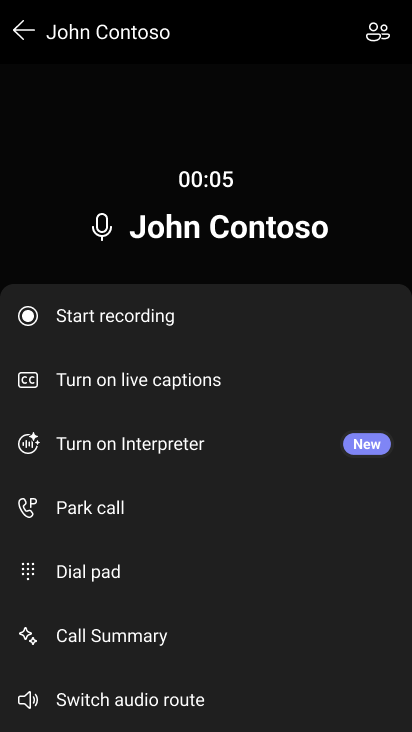
We’re adding AI-powered live interpretation to Microsoft Teams Phone devices to help organizations support multilingual collaboration during calls and meetings. This update enables users with a Microsoft 365 Copilot license to hear real-time interpreted audio directly on certified Teams Phone hardware, reducing reliance on external interpreters and improving accessibility for globally distributed teams.
This message is associated with Microsoft 365 Roadmap ID 553594.
[When this will happen]
General Availability (Worldwide and GCC): We have decided not to move forward with this change at this time.
[How this affects your organization]
Who is affected
- Users on certified Teams Phone devices (touch and non-touch)
- Users with a Microsoft 365 Copilot license
- Admins managing Teams calling and meeting policies
What will happen
- Eligible users will be able to use AI-powered live interpretation during:
- 1:1 VoIP and Public Switched Telephone Network (PSTN) calls
- Group VoIP calls
- VoIP group calls escalated with a PSTN user
- Ad-hoc and scheduled meetings
- Pure PSTN group calls are not supported.
- On first use, users will select a preferred interpretation language; preferences and volume levels are saved automatically.
- A visual indicator will appear for all participants when interpretation is active.
- Users will only see the AI Interpreter option when:
- The tenant has enabled the required calling and meeting policies, and
- The user holds an eligible license.
- The feature is off by default and does not change calling experiences for users without the required configuration.
[What you can do to prepare]
- Confirm that users who need this capability have a Microsoft 365 Copilot license.
- Enable AI Interpreter in your Teams policies:
- Set-CsTeamsCallingPolicy
- Set-CsTeamsMeetingPolicy
- Communicate the experience to your helpdesk and affected Teams Phone users.
- Update internal documentation or device usage guides as needed.
Learn more: Manage Interpreter agent for your organization | Microsoft Teams | Microsoft Learn
[Compliance considerations]
No compliance considerations identified. Review as appropriate for your organization.
Change History
Never Miss a Microsoft 365 Update
Join thousands of IT professionals who rely on DeltaPulse for real-time Microsoft 365 change intelligence, automated notifications, and community insights.