Favorite your Message Center and Roadmap items. Access them anytime via your Profile. Export and share with your team or your LLM.

Microsoft Purview | Data Lifecycle Management - Hard delete OneDrive and SharePoint files with priority cleanup workflow

Message ID
MC1261587
View in Message Center
Service
Microsoft Purview
Category
Plan for Change
Tags
Major Change New featureAdmin impact
Rollout
July 2026September 2026
Roadmap ID
558343
View in M365 Roadmap
Platform
Web

Summary

Microsoft Purview introduces a priority cleanup workflow enabling admins to hard delete specific OneDrive and SharePoint content, even under retention or holds, with required eDiscovery approval. Rolling out from July to September 2026, it helps reduce data risk while maintaining compliance, requiring explicit admin configuration.

Details

Updated June 10, 2026: We have updated the timeline. Thank you for your patience. 

[Introduction]

We are introducing a new priority cleanup workflow in Microsoft Purview Data Lifecycle Management that allows administrators to permanently delete (hard delete) specific OneDrive and SharePoint content types, even when retention policies or holds are in place. This capability helps reduce data exposure risk from rapidly growing Copilot-related content while maintaining compliance through required eDiscovery admin review and approval.

This change is associated with Microsoft 365 Roadmap ID 558343.

[When this will happen:]

Public Preview: We will begin rolling out mid-July 2026 and expect to complete by late July 2026.

General Availability (Worldwide) Rollout begins early September 2026 (previously late May) and is expected to complete by mid-September 2026 (previously mid-June).

[How this affects your organization:]

Who is affected:

  • Microsoft 365 administrators managing Microsoft Purview Data Lifecycle Management
  • Organizations using OneDrive for Business and SharePoint Online with retention policies or holds

What will happen:

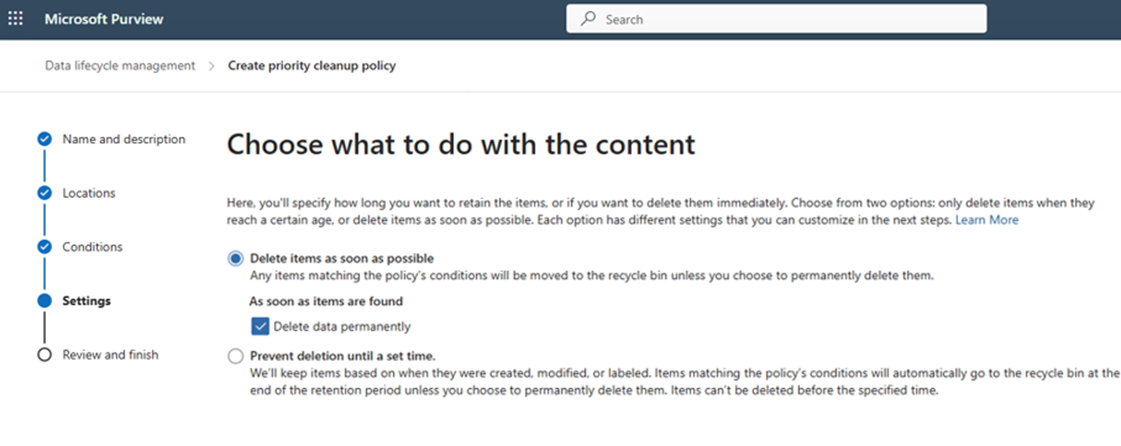
  • Admins can create a priority cleanup policy targeting specific content types in OneDrive and SharePoint.
  • A new Delete data permanently option enables hard deletion of targeted items.
  • user settings

  • Content deleted through this workflow is fully removed and is no longer discoverable in:
    • SharePoint search
    • Copilot experiences
    • eDiscovery (after required approval)
  • For content under hold, eDiscovery admin review and approval is required before deletion.
  • This capability is not enabled by default and requires explicit admin configuration.
  • There is no change to user workflows unless an admin configures and applies a priority cleanup policy.
[What you can do to prepare:]

  • Review your organization’s data risk and retention strategy, especially for Copilot-generated content such as Teams transcripts.
  • In Microsoft Purview, plan and configure a priority cleanup policy if permanent deletion is required for specific content types:
    • Navigate to Microsoft Purview portal > Data Lifecycle Management > Priority cleanup.
    • Create a new policy and select Delete data permanently in the policy settings.
  • Ensure appropriate eDiscovery admin roles and approval processes are in place for content under hold.
  • Update internal governance or compliance documentation to reflect this new deletion capability.

Learn more: Compare types of groups in Microsoft 365 - Microsoft 365 admin | Microsoft Learn

[Compliance considerations:]

Compliance area Explanation
Alteration of existing customer data processing This change introduces a priority cleanup workflow that allows permanent deletion of specific OneDrive and SharePoint content types, even when retention policies or holds exist, subject to required approval.
eDiscovery or Content Search Content deleted through the priority cleanup workflow is fully removed and no longer discoverable in eDiscovery or Content Search after eDiscovery admin review and approval for items under hold.
Retention policies, holds, or deletion workflows Adds a new admin-controlled deletion workflow that can override standard retention outcomes through an approved hard-delete process.
Admin controls and compliance monitoring The feature is managed by administrators in Microsoft Purview and includes review and approval steps that support compliance oversight and auditing.

Change History

Show
June 10, 2026 at 8:30 PM Updated
Summary
Previous
Microsoft Purview introduces a priority cleanup workflow enabling admins to hard delete specific OneDrive and SharePoint content, even under retention or holds, with required eDiscovery approval. Rolling out worldwide from early to mid-September 2026, this feature requires explicit admin setup and supports compliance monitoring.
New
Microsoft Purview introduces a priority cleanup workflow enabling admins to hard delete specific OneDrive and SharePoint content, even under retention or holds, with required eDiscovery approval. Rolling out from July to September 2026, it helps reduce data risk while maintaining compliance, requiring explicit admin configuration.
Last Updated Date
Previous
2026-06-10T16:34:16.830Z
New
2026-06-10T18:26:44.370Z
Body Content
Previous
<p>Updated June 10, 2026: We have updated the timeline. Thank you for your patience.&nbsp;</p><p><b>[Introduction]</b></p> <p>We are introducing a new <b>priority cleanup workflow</b> in Microsoft Purview Data Lifecycle Management that allows administrators to <b>permanently delete (hard delete) specific OneDrive and SharePoint content types</b>, even when retention policies or holds are in place. This capability helps reduce data exposure risk from rapidly growing Copilot-related content while maintaining compliance through required eDiscovery admin review and approval.</p><p>This change is associated with Microsoft 365 Roadmap ID <a href="https://www.microsoft.com/microsoft-365/roadmap?filters=&amp;searchterms=558343" target="_blank">558343</a>.</p> <p><b>[When this will happen:]</b></p> <p>General Availability (Worldwide) Rollout begins<b> early September 2026</b> (previously&nbsp;late May)&nbsp;and is expected to complete by <b>mid-September 2026</b> (previously&nbsp;mid-June).</p> <p><b>[How this affects your organization:]</b></p> <p><b>Who is affected:</b></p> <ul> <li>Microsoft 365 administrators managing <b>Microsoft Purview Data Lifecycle Management</b></li> <li>Organizations using <b>OneDrive for Business</b> and <b>SharePoint Online </b>with retention policies or holds</li> </ul> <p><b>What will happen:</b></p> <ul> <li>Admins can create a<b> priority cleanup policy</b> targeting specific content types in OneDrive and SharePoint.</li> <li>A new <b>Delete data permanently </b>option enables <b>hard deletion</b> of targeted items.</li><p><img src="https://cxcs.microsoft.net/file/ccp/en-us/d4952292-7b09-45aa-8255-c94bb5be4158" style="width: 400px;" alt="user settings"></p> <li>Content deleted through this workflow is fully removed and is no longer discoverable in:<ul><li>SharePoint search</li><li>Copilot experiences</li><li>eDiscovery (after required approval)</li></ul></li><li>For content under hold, <b>eDiscovery admin review and approval</b> is required before deletion.</li><li>This capability is <b>not enabled by default</b> and requires explicit admin configuration.</li><li>There is <b>no change to user workflows</b> unless an admin configures and applies a priority cleanup policy.</li></ul> <p><b>[What you can do to prepare:]</b></p> <ul> <li>Review your organization’s data risk and retention strategy, especially for Copilot-generated content such as Teams transcripts.</li><li>In Microsoft Purview, plan and configure a<b> priority cleanup policy</b> if permanent deletion is required for specific content types:<ul><li>Navigate to <b>Microsoft Purview portal</b> &gt;<b> Data Lifecycle Management</b> &gt;<b> Priority cleanup</b>.</li><li>Create a new policy and select <b>Delete data permanently</b> in the policy settings.</li></ul></li><li>Ensure appropriate <b>eDiscovery admin roles and approval processes</b> are in place for content under hold.</li><li>Update internal governance or compliance documentation to reflect this new deletion capability.</li></ul> <p><b>Learn more: </b><a href="https://learn.microsoft.com/microsoft-365/admin/create-groups/compare-groups?view=o365-worldwide#microsoft-365-groups" target="_blank">Compare types of groups in Microsoft 365 - Microsoft 365 admin | Microsoft Learn</a></p><p><b>[Compliance considerations:]</b></p> <table border="1" cellpadding="5" cellspacing="0"> <tbody><tr> <td><b>Compliance area</b></td> <td><b>Explanation</b></td> </tr> <tr> <td>Alteration of existing customer data processing</td> <td>This change introduces a priority cleanup workflow that allows permanent deletion of specific OneDrive and SharePoint content types, even when retention policies or holds exist, subject to required approval.</td> </tr> <tr> <td>eDiscovery or Content Search</td> <td>Content deleted through the priority cleanup workflow is fully removed and no longer discoverable in eDiscovery or Content Search after eDiscovery admin review and approval for items under hold.</td> </tr> <tr> <td>Retention policies, holds, or deletion workflows</td> <td>Adds a new admin-controlled deletion workflow that can override standard retention outcomes through an approved hard-delete process.</td> </tr> <tr> <td>Admin controls and compliance monitoring</td> <td>The feature is managed by administrators in Microsoft Purview and includes review and approval steps that support compliance oversight and auditing.</td> </tr> </tbody></table>
New
<p>Updated June 10, 2026: We have updated the timeline. Thank you for your patience.&nbsp;</p><p><b>[Introduction]</b></p> <p>We are introducing a new <b>priority cleanup workflow</b> in Microsoft Purview Data Lifecycle Management that allows administrators to <b>permanently delete (hard delete) specific OneDrive and SharePoint content types</b>, even when retention policies or holds are in place. This capability helps reduce data exposure risk from rapidly growing Copilot-related content while maintaining compliance through required eDiscovery admin review and approval.</p><p>This change is associated with Microsoft 365 Roadmap ID <a href="https://www.microsoft.com/microsoft-365/roadmap?filters=&amp;searchterms=558343" target="_blank">558343</a>.</p> <p><b>[When this will happen:]</b></p> <p>Public Preview: We will begin rolling out mid-July 2026 and expect to complete by late July 2026.</p><p>General Availability (Worldwide) Rollout begins<b> early September 2026</b> (previously&nbsp;late May)&nbsp;and is expected to complete by <b>mid-September 2026</b> (previously&nbsp;mid-June).</p> <p><b>[How this affects your organization:]</b></p> <p><b>Who is affected:</b></p> <ul> <li>Microsoft 365 administrators managing <b>Microsoft Purview Data Lifecycle Management</b></li> <li>Organizations using <b>OneDrive for Business</b> and <b>SharePoint Online </b>with retention policies or holds</li> </ul> <p><b>What will happen:</b></p> <ul> <li>Admins can create a<b> priority cleanup policy</b> targeting specific content types in OneDrive and SharePoint.</li> <li>A new <b>Delete data permanently </b>option enables <b>hard deletion</b> of targeted items.</li><p><img src="https://cxcs.microsoft.net/file/ccp/en-us/d4952292-7b09-45aa-8255-c94bb5be4158" style="width: 400px;" alt="user settings"></p> <li>Content deleted through this workflow is fully removed and is no longer discoverable in:<ul><li>SharePoint search</li><li>Copilot experiences</li><li>eDiscovery (after required approval)</li></ul></li><li>For content under hold, <b>eDiscovery admin review and approval</b> is required before deletion.</li><li>This capability is <b>not enabled by default</b> and requires explicit admin configuration.</li><li>There is <b>no change to user workflows</b> unless an admin configures and applies a priority cleanup policy.</li></ul> <p><b>[What you can do to prepare:]</b></p> <ul> <li>Review your organization’s data risk and retention strategy, especially for Copilot-generated content such as Teams transcripts.</li><li>In Microsoft Purview, plan and configure a<b> priority cleanup policy</b> if permanent deletion is required for specific content types:<ul><li>Navigate to <b>Microsoft Purview portal</b> &gt;<b> Data Lifecycle Management</b> &gt;<b> Priority cleanup</b>.</li><li>Create a new policy and select <b>Delete data permanently</b> in the policy settings.</li></ul></li><li>Ensure appropriate <b>eDiscovery admin roles and approval processes</b> are in place for content under hold.</li><li>Update internal governance or compliance documentation to reflect this new deletion capability.</li></ul> <p><b>Learn more: </b><a href="https://learn.microsoft.com/microsoft-365/admin/create-groups/compare-groups?view=o365-worldwide#microsoft-365-groups" target="_blank">Compare types of groups in Microsoft 365 - Microsoft 365 admin | Microsoft Learn</a></p><p><b>[Compliance considerations:]</b></p> <table border="1" cellpadding="5" cellspacing="0"> <tbody><tr> <td><b>Compliance area</b></td> <td><b>Explanation</b></td> </tr> <tr> <td>Alteration of existing customer data processing</td> <td>This change introduces a priority cleanup workflow that allows permanent deletion of specific OneDrive and SharePoint content types, even when retention policies or holds exist, subject to required approval.</td> </tr> <tr> <td>eDiscovery or Content Search</td> <td>Content deleted through the priority cleanup workflow is fully removed and no longer discoverable in eDiscovery or Content Search after eDiscovery admin review and approval for items under hold.</td> </tr> <tr> <td>Retention policies, holds, or deletion workflows</td> <td>Adds a new admin-controlled deletion workflow that can override standard retention outcomes through an approved hard-delete process.</td> </tr> <tr> <td>Admin controls and compliance monitoring</td> <td>The feature is managed by administrators in Microsoft Purview and includes review and approval steps that support compliance oversight and auditing.</td> </tr> </tbody></table>
June 10, 2026 at 6:30 PM Updated
Summary
Previous
Microsoft Purview introduces a priority cleanup workflow allowing admins to hard delete specific OneDrive and SharePoint content, even under retention or holds, with required eDiscovery approval. Rolling out late May to mid-June 2026, this feature reduces data risk while maintaining compliance and requires explicit admin setup.
New
Microsoft Purview introduces a priority cleanup workflow enabling admins to hard delete specific OneDrive and SharePoint content, even under retention or holds, with required eDiscovery approval. Rolling out worldwide from early to mid-September 2026, this feature requires explicit admin setup and supports compliance monitoring.
Last Updated Date
Previous
2026-03-25T22:55:44.767Z
New
2026-06-10T16:34:16.830Z
Tags
Previous
New feature,Admin impact
New
Updated message,New feature,Admin impact
Body Content
Previous
<p><b>[Introduction]</b></p> <p>We are introducing a new <b>priority cleanup workflow</b> in Microsoft Purview Data Lifecycle Management that allows administrators to <b>permanently delete (hard delete) specific OneDrive and SharePoint content types</b>, even when retention policies or holds are in place. This capability helps reduce data exposure risk from rapidly growing Copilot-related content while maintaining compliance through required eDiscovery admin review and approval.</p><p>This change is associated with Microsoft 365 Roadmap ID <a href="https://www.microsoft.com/microsoft-365/roadmap?filters=&amp;searchterms=558343" target="_blank">558343</a>.</p> <p><b>[When this will happen:]</b></p> <p>General Availability (Worldwide) Rollout begins <b>late May 2026</b> and is expected to complete by <b>mid-June 2026</b>.</p> <p><b>[How this affects your organization:]</b></p> <p><b>Who is affected:</b></p> <ul> <li>Microsoft 365 administrators managing <b>Microsoft Purview Data Lifecycle Management</b></li> <li>Organizations using <b>OneDrive for Business</b> and <b>SharePoint Online </b>with retention policies or holds</li> </ul> <p><b>What will happen:</b></p> <ul> <li>Admins can create a<b> priority cleanup policy</b> targeting specific content types in OneDrive and SharePoint.</li> <li>A new <b>Delete data permanently </b>option enables <b>hard deletion</b> of targeted items.</li><p><img src="https://cxcs.microsoft.net/file/ccp/en-us/d4952292-7b09-45aa-8255-c94bb5be4158" style="width: 400px;" alt="user settings"></p> <li>Content deleted through this workflow is fully removed and is no longer discoverable in:<ul><li>SharePoint search</li><li>Copilot experiences</li><li>eDiscovery (after required approval)</li></ul></li><li>For content under hold, <b>eDiscovery admin review and approval</b> is required before deletion.</li><li>This capability is <b>not enabled by default</b> and requires explicit admin configuration.</li><li>There is <b>no change to user workflows</b> unless an admin configures and applies a priority cleanup policy.</li></ul> <p><b>[What you can do to prepare:]</b></p> <ul> <li>Review your organization’s data risk and retention strategy, especially for Copilot-generated content such as Teams transcripts.</li><li>In Microsoft Purview, plan and configure a<b> priority cleanup policy</b> if permanent deletion is required for specific content types:<ul><li>Navigate to <b>Microsoft Purview portal</b> &gt;<b> Data Lifecycle Management</b> &gt;<b> Priority cleanup</b>.</li><li>Create a new policy and select <b>Delete data permanently</b> in the policy settings.</li></ul></li><li>Ensure appropriate <b>eDiscovery admin roles and approval processes</b> are in place for content under hold.</li><li>Update internal governance or compliance documentation to reflect this new deletion capability.</li></ul> <p><b>Learn more: </b><a href="https://learn.microsoft.com/microsoft-365/admin/create-groups/compare-groups?view=o365-worldwide#microsoft-365-groups" target="_blank">Compare types of groups in Microsoft 365 - Microsoft 365 admin | Microsoft Learn</a></p><p><b>[Compliance considerations:]</b></p> <table border="1" cellpadding="5" cellspacing="0"> <tbody><tr> <td><b>Compliance area</b></td> <td><b>Explanation</b></td> </tr> <tr> <td>Alteration of existing customer data processing</td> <td>This change introduces a priority cleanup workflow that allows permanent deletion of specific OneDrive and SharePoint content types, even when retention policies or holds exist, subject to required approval.</td> </tr> <tr> <td>eDiscovery or Content Search</td> <td>Content deleted through the priority cleanup workflow is fully removed and no longer discoverable in eDiscovery or Content Search after eDiscovery admin review and approval for items under hold.</td> </tr> <tr> <td>Retention policies, holds, or deletion workflows</td> <td>Adds a new admin-controlled deletion workflow that can override standard retention outcomes through an approved hard-delete process.</td> </tr> <tr> <td>Admin controls and compliance monitoring</td> <td>The feature is managed by administrators in Microsoft Purview and includes review and approval steps that support compliance oversight and auditing.</td> </tr> </tbody></table>
New
<p>Updated June 10, 2026: We have updated the timeline. Thank you for your patience.&nbsp;</p><p><b>[Introduction]</b></p> <p>We are introducing a new <b>priority cleanup workflow</b> in Microsoft Purview Data Lifecycle Management that allows administrators to <b>permanently delete (hard delete) specific OneDrive and SharePoint content types</b>, even when retention policies or holds are in place. This capability helps reduce data exposure risk from rapidly growing Copilot-related content while maintaining compliance through required eDiscovery admin review and approval.</p><p>This change is associated with Microsoft 365 Roadmap ID <a href="https://www.microsoft.com/microsoft-365/roadmap?filters=&amp;searchterms=558343" target="_blank">558343</a>.</p> <p><b>[When this will happen:]</b></p> <p>General Availability (Worldwide) Rollout begins<b> early September 2026</b> (previously&nbsp;late May)&nbsp;and is expected to complete by <b>mid-September 2026</b> (previously&nbsp;mid-June).</p> <p><b>[How this affects your organization:]</b></p> <p><b>Who is affected:</b></p> <ul> <li>Microsoft 365 administrators managing <b>Microsoft Purview Data Lifecycle Management</b></li> <li>Organizations using <b>OneDrive for Business</b> and <b>SharePoint Online </b>with retention policies or holds</li> </ul> <p><b>What will happen:</b></p> <ul> <li>Admins can create a<b> priority cleanup policy</b> targeting specific content types in OneDrive and SharePoint.</li> <li>A new <b>Delete data permanently </b>option enables <b>hard deletion</b> of targeted items.</li><p><img src="https://cxcs.microsoft.net/file/ccp/en-us/d4952292-7b09-45aa-8255-c94bb5be4158" style="width: 400px;" alt="user settings"></p> <li>Content deleted through this workflow is fully removed and is no longer discoverable in:<ul><li>SharePoint search</li><li>Copilot experiences</li><li>eDiscovery (after required approval)</li></ul></li><li>For content under hold, <b>eDiscovery admin review and approval</b> is required before deletion.</li><li>This capability is <b>not enabled by default</b> and requires explicit admin configuration.</li><li>There is <b>no change to user workflows</b> unless an admin configures and applies a priority cleanup policy.</li></ul> <p><b>[What you can do to prepare:]</b></p> <ul> <li>Review your organization’s data risk and retention strategy, especially for Copilot-generated content such as Teams transcripts.</li><li>In Microsoft Purview, plan and configure a<b> priority cleanup policy</b> if permanent deletion is required for specific content types:<ul><li>Navigate to <b>Microsoft Purview portal</b> &gt;<b> Data Lifecycle Management</b> &gt;<b> Priority cleanup</b>.</li><li>Create a new policy and select <b>Delete data permanently</b> in the policy settings.</li></ul></li><li>Ensure appropriate <b>eDiscovery admin roles and approval processes</b> are in place for content under hold.</li><li>Update internal governance or compliance documentation to reflect this new deletion capability.</li></ul> <p><b>Learn more: </b><a href="https://learn.microsoft.com/microsoft-365/admin/create-groups/compare-groups?view=o365-worldwide#microsoft-365-groups" target="_blank">Compare types of groups in Microsoft 365 - Microsoft 365 admin | Microsoft Learn</a></p><p><b>[Compliance considerations:]</b></p> <table border="1" cellpadding="5" cellspacing="0"> <tbody><tr> <td><b>Compliance area</b></td> <td><b>Explanation</b></td> </tr> <tr> <td>Alteration of existing customer data processing</td> <td>This change introduces a priority cleanup workflow that allows permanent deletion of specific OneDrive and SharePoint content types, even when retention policies or holds exist, subject to required approval.</td> </tr> <tr> <td>eDiscovery or Content Search</td> <td>Content deleted through the priority cleanup workflow is fully removed and no longer discoverable in eDiscovery or Content Search after eDiscovery admin review and approval for items under hold.</td> </tr> <tr> <td>Retention policies, holds, or deletion workflows</td> <td>Adds a new admin-controlled deletion workflow that can override standard retention outcomes through an approved hard-delete process.</td> </tr> <tr> <td>Admin controls and compliance monitoring</td> <td>The feature is managed by administrators in Microsoft Purview and includes review and approval steps that support compliance oversight and auditing.</td> </tr> </tbody></table>

Never Miss a Microsoft 365 Update

Join thousands of IT professionals who rely on DeltaPulse for real-time Microsoft 365 change intelligence, automated notifications, and community insights.